• #
  • #
  • #
  • #
Showing posts with label Information. Show all posts

Samsung Galaxy Note 3 rumored to have 4K video capture

Penulis : Pada Hari : Tuesday, August 27, 2013 | Jam : 5:40 PM
The forthcoming phablet could be the first mobile device to offer Ultra High Definition video recording in 4K resolution, but we think that's a long shot.

The forthcoming Samsung Galaxy Note 3 could be the first smartphone to boast Ultra High Definition video recording, reports The Korea Economic Daily (translate).
With only days left before the expected official IFA announcement, new rumors like this have bubbled to the surface.

According to the Korean news outlet, the phablet will be the first to offer 4K (3,840x2,160-pixel) video capture. What's more, the device is alleged to provide 24-bit/192KHz music playback, a step above the 16-bit audio found in previous generations.
While the Ultra HD video sounds fantastic, it's worth noting that there are currently no smartphones capable of playing back video at such a resolution. Going a step further, it's hard to imagine the Galaxy Note 3 having enough storage to hold said videos. It also isn't clear what the purpose of videos would be at such a high resolution, since 4K TV sets are still a long ways off from being the norm.
As one rumor that must be taken with not just a grain, but a handful of salt, I am reminded of the 3D display and video recording fad from a few years back. Remember how smartphones were going to spur the adoption of 3D televisions? Now, consider that a recently reduced rate Samsung TV can still cost $4,999. Recording 4K video on a mobile device seems like a feature that would be wasted on most users.
Read More » No comments

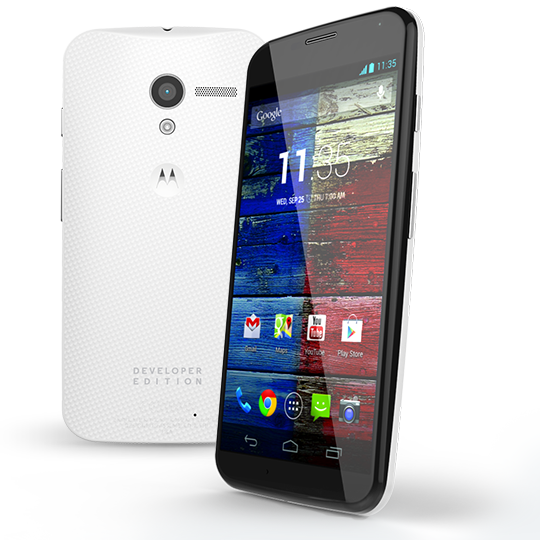
Motorola reveals : 32GB Moto X Developer Edition coming soon

Penulis : Pada Hari : Sunday, August 25, 2013 | Jam : 11:01 PM
Last week, Punit Soni (Motorola’s VP of Product Management) told us that we were “days” away from the arrival of Developer Editions and other carrier models of the Moto X. Yesterday, Motorola updated their Moto X “ways to buy” page, showing off the new Developer Edition, which will sport a black front panel coupled with a white woven rear back plate. The render of the phone also shows the words “DEVELOPER EDITION” engraved on the bottom.

The company says the phone will have “of course” an unlockable bootloader, but reminds you in footnotes that unlocking the bootloader of the phone “voids all warranties and may cause serious harm to your device.”

The page mentions that the dev edition will “have a look all its own,” meaning the two-tone color scheme is something different than what you’ll find in carrier models. Now, once MotoMaker is fully opened up or should you buy a Moto X card from AT&T, you could essentially build a similar looking device.

The listing also confirms 32GB of storage and an unlockable bootloader. No price is listed just yet, but since the AT&T 32GB model runs $629, I’d be surprised if it was lower.

As we said before, the phone can be already ordered from AT&T, with MotoMaker customization support coming soon. Other U.S. carriers including Verizon, Sprint and U.S. Cellular will also have the device in stores soon.
Read More » No comments

Tips and tricks for Motorola's new Droid smartphones
These tips will help you transfer your data, share information with friends, and use your new smartphone to the fullest.


Motorola delivered a punch with its new Droid smartphones. Partnering with Verizon Wireless, the company announced the Droid Mini, Droid Ultra, and Droid Maxx at a press event in New York City last month. All three handsets are equipped with Motorola's custom X8 Mobile Computing System, 720p displays, 2GB of RAM, and 10-megapixel rear cameras. Motorola isn't pushing the specs, however, but is instead focusing on the unique features it has bundled with the devices.
Here's a list of some of those features and instructions on how to use them:

1. Motorola Migrate
 
It can be a hassle when it comes time to transfer files from an old phone to a new one. Luckily, the new Droids come with Motorola Migrate, a tool that can seamlessly transfer media, call and text history, and SIM contacts from your old device to your new one.
To do this, launch the Motorola Migrate app that comes preloaded on your Droid smartphone and hit the next button until you see a QR code on your screen. Then, download the app from the Google Play store on your old device, open it, select Start, and simply scan the QR code. The process will take several minutes to complete and in the end you should have most, if not all, of your old files on your new smartphone. 

2. Droid Zap
Droid Zap is built directly into the new Droid smartphones and gives them the ability to wirelessly share photos and videos with other Android devices within 1,000 feet. Unlike other sharing methods that require NFC, Bluetooth, or a Wi-Fi Direct connection, Droid Zap utilizes your data connection to quickly share files with other users.
The feature does have its fair share of limitations, though. Any Android device can receive shared content through the Droid Zap app, but only the three new Droid smartphones can send items to other users.
Droid Zap can be enabled in the Settings menu, while non-Droid devices can download the free app from the Google Play store. To use the feature on a new Droid device, enter the gallery, select the image or video you would like to share, and perform an upward two-finger swipe gesture on the screen. To receive a Zap on one of the new Droids simply perform a downward two-finger swipe gesture; those with non-Droid devices will be required to perform the same gesture inside the Droid Zap app.
The feature is responsive, easy to use, and actually very useful. Zaps can even be locked in the Settings menu, requiring users on the receiving end to enter a randomized code to view the shared material. 

3. Motorola Connect
Another interesting feature is Motorola Connect, a Chrome extension that allows you to see incoming calls and text messages when you are away from your phone. Using only your computer, you are able to ignore calls, and read and respond to text messages. The setup is relatively simple: go to your phone's settings, select Active Notifications, and turn on the Motorola Connect feature. Next, download the Motorola Connect extension in the Chrome Web Store, log in with your Google account, and you should be good to go.
Motorola Connect is supported on the Moto X, the Droid Mini, the Droid Ultra, and the Droid Maxx. 

4. Wireless Display
There has been a lot of buzz about Chromecast, the $35 dongle that allows you to wirelessly stream content from your mobile device to a TV. You may not have been aware, however, that the Droid Mini, the Droid Ultra, and the Droid Maxx include their own TV-sharing capabilities. Using Motorola's Wireless Display integration, the three smartphones can stream content to Miracast-compatible HDTVs.
The Wireless Display setting can be accessed through the Droid Command Center, which is located on the left side of the home screen clock widget. Make sure you are on the same Wi-Fi network as your HDTV, then turn the Wireless Display feature on, and select your TV from the list.
Your entire screen will then be mirrored on the TV, giving you the ability to browse the Web, play games, listen to music, or cast movies from your device to the TV screen.

Read More » No comments

Video Comparison: New Nexus 7 Vs the Old Nexus 7

Penulis : Pada Hari : Saturday, August 24, 2013 | Jam : 6:07 PM
We've talked a lot lately about the new Nexus 7 and compared the new and old models on paper, but this week we tested the two side-by-side and made a comparison video. You can find the video below, and we've included the transcription here if streaming video is not your thing.

Asus has once again built the Google Nexus 7 and we just got one in the AndroidPIT office. The first thing you notice is how different the new tablet looks compared to last year's model. For starters the back of the tablet now has a nice smooth finish which looks much better compared to the old Nexus' textured back.
You'll also notice the addition of a rear-facing camera on the new Nexus 7, a 5 MP snapper that didn't appear on the old model at all. However, both devices have 1.2 MP front-facing cameras that perform equally poorly. The new Nexus 7 now has internal stereo speakers.

How about dimensions? The new Nexus 7 is a little bit smaller than the older model, just under 2 mm thinner and a fraction thinner in width. The screens however are the same size, although the new model packs in a wonderful 323 pixels per inch comapred to the older model which only had 216 ppi in the same area – that's a neat 1.5 times more pixels per inch in the new Nexus 7.
Speaking of resolution, the 2013 Nexus 7 has slightly better than Full HD resolution, with 1920 x 1200 pixels. Full HD is 1920 x 1080 pixels. Similarly the old Nexus 7 had slightly better than HD resolution, with 1280 x 800 pixels, whereas HD resolution is 1280 x 720. This ''additional'' resolution is due to the 16:9 aspect ratio of the Nexus 7's. In comparison, the iPad Mini has a 4:3 aspect ratio – this is basically the difference between widescreen tvs and traditional television sets.


Once we turn the devices on you can really see the difference in screens. The new Nexus 7 has a 7-inch, LED-backlit, LCD IPS touchscreen, and combined with the additional pixel density the results are pretty stunning. It's seriously bright in comparison. The new Nexus 7 also shipped with Android 4.3 straight out of the box, and one of the main features of 4.3 is that it includes OpenGL ES3.0 graphics as standard. The old Nexus 7 is upgradable to Android 4.3 but the older Nexus 7 has GeForce graphics compared to the new model's Adreno 320 chip and of course, a lower pixel count.


As for CPU's the new Nexus 7 has a quad-core Snapdragon S4 Pro which we discovered is actually a throttled back Snapdragon 600 processor. The new Nexus 7 CPU ticks at 1.5 GHz whereas the Snapdragon 600 is capable of 1.7 GHz. In comparison the older model has a quad-core Asus Tegra 3 chip running at 1.2 GHz. So there's certainly a lot more speed available in the newer device. The new Nexus 7 also ships with 2 GB RAM.
Scrolling through the app pages it's easy to see the difference in lag time and smoothness between the new and old Nexus 7. We should note too that the new Nexus 7 comes with Google Play Games and Play Textbooks pre-installed. And considering the print-resolution display, the new Nexus 7 can certainly compete as an e-book reader – something Google mentioned during the launch of the device.
One of the interesting features of Android 4.3 is multi-user profiles that the device owner can apply restrictions to. Say if you're sharing your work tablet with the family at home and you want to protect valuable data. Or if you want to stop the kids going crazy with in-app purchases. It's super easy to set up and apply the restrictions you want. Switching between users is as simple as returning to the lock screen, and the owner's profile can be password or pattern lock protected.
Android 4.3 also has a function called TRIM, whereby the system regularly looks for old data points in the index and clears them up if the files they point to have since been deleted. This minefield of extinct data blocks was one of the main reasons the old Nexus 7 suffered from major slow-down over time. But with the OS update your old Nexus 7 should get a fresh lease on life. Of course the new Nexus 7 has TRIM from the start so it shouldn't suffer the slow-down at all.


Now there's been a few problems reported in the new Nexus 7, like GPS location issues, multi-touch weirdness and error messages when trying to update apps in the Play Store. We didn't experience any of these problems while we played with the device but there's enough reports of them to have Google scrambling to fix the bugs.
As far as battieries go, the new model actually has a smaller battery capacity than the older model: from 4325 mAh to 3950.. This shouldn't be a problem however as improved software integration should see a healthy shelf-life from the new model's battery pack. The smaller battery has also helped the new Nexus 7 come in 50 grams lighter than the 2012 model. 


So what does the new Nexus 7 cost? There's three options: $229 for the 16 GB model with WiFi, $269 for the 32 GB model with WiFi and $349 for the 32 GB version with WiFi and LTE, aka 4G.
While I previously said there's not too much in the way of improvements from the old Nexus 7 to the new (especially if you're perfectly happy with your old model) to warrant the upgrade, now that I've seen that extra resolution and improved graphics capability I have to say I'm possibly a convert.
Read More » No comments

Top 10 coolest Google Nexus 7 features

Penulis : Pada Hari : Friday, August 23, 2013 | Jam : 5:45 PM
Google took the world by storm last year when it launched its first ever own-brand tablet, the Nexus 7. Offering top-end quad-core performance and Google's then latest Android 4.1 Jelly Bean, but costing less than £200, the tablet was an unexpected success, stealing a significant portion of the tablet market from Apple.
But one year on, the Nexus 7's control of the tiny tablet market has been challenged, with key competitor Apple releasing the iPad Mini and Amazon releasing its Kindle Fire HD. Aware of this, Google has come out swinging, unveiling a new super-swish upgraded Nexus 7.
What's more, it is absolutely chock-a-block full of new features and under the bonnet upgrades. So much so, in fact, that knowing what's actually new on the latest Nexus 7 can be difficult. Here to help, as ever, V3 has put together a definitive list of the new Nexus 7's 10 best features.


Google Nexus 7 2 has a 5MP rear-facing cmaera10. Rear camera

One major shortcoming on the original Nexus 7 was the absence of a rear-facing camera.
While we still maintain taking photos on a tablet makes you look like an absolute plonker, many people complained about not being able to take photos using their Nexus 7. So Google added a 5MP rear camera to the new model.
While the low megapixel count means the new Nexus 7 won't be anywhere as good at snapping photos as most top-end smartphones, the new camera software added to Google's latest Android 4.3 OS means images should still at the very least be usable.


Large gold pound sign9. Cost
The cost of the basic Nexus 7 unit is £199.99 and for that you get 16GB of internal storage and WiFi connectivity.
The 32GB model steps up to £239.99, and the 4G 32GB unit will cost £299.99. All of these prices compare favourably to Apple's iPad Mini offering, the cheapest of which can be yours for £269.99.
Meanwhile, the original Nexus 7 continues to sell for £159.99, but we'd recommend plumping for the new model if you have the extra cash, as the new Nexus 7 is rather more future-proof than its predecessor.


image-of-the-plantronics-audio-920-bluetooth-headset8. Bluetooth smart
Apple iOS devices have boasted Bluetooth smart technology since the start of 2012, however it has only just arrived on Android with the release of Android 4.3 Jelly Bean.
While it sounds small, the inclusion of Bluetooth smart is a big deal as it lets the new Nexus 7 connect with next generation, power efficient Bluetooth accessories, like remote speakers, fitness equipment and other smart devices. As an added perk, the connection is significantly less power demanding than traditional Bluetooth connections.
Given the number of desk gadgets and "productivity" aiding smart device peripherals most business folk like to surround themselves with these days, we're thinking the addition is going to be a big boon for work tablet users.


plug7. Better battery
Considering all the new features, including the very impressive screen and the faster processor, you would expect battery performance to be diminished.
On top of that, in order to achieve the wafer-thin design of the device, Asus had to cut the battery's capacity by roughly 10 percent from 4,325mAh to 3,950mAh. Despite this, reports suggest that battery life is extremely favourable in comparison with the original machine. So, no worries there if you're a heavy user who's away from power outlets for a while.
The battery also supports wireless charging on the Qi standard, which is a great addition for those who prefer not to have cables for multiple devices trailing around.

 
Google Nexus 7 2  has a full HD 7in screen6. Sleeker design
Google chose to completely rework the new Nexus 7's design, hoping to make it look far nicer and than its predecessor, which, featuring a glued on back and glass screen, felt a little bolted together. Doing so Google's given the new Nexus' a smooth finish and slightly rounded chassis that wraps around the device's sides.
It's also made the tablet slightly thinner and lighter than the 197x120x10.5mm, 340g original Nexus, with it measuring in at 200x114x8.65mm and weighing a feather-light 290g.
All this adds up to make the Nexus one of the nicest looking 7in tablets currently available.

Call of Duty Black Ops 2 soldier 5. OpenGL ES 3.0 support
OpenGL ES 3.0 is a key under the hood addition to Google's Android 4.3 OS designed to entice developers to create more applications for the ecosystem. Believe it or not Android is the first operating system to support the new API extensions, which is odd considering how many awesome perks it offers.
The tech lets developers create much nicer-looking applications than before, letting them produce more detailed graphical textures and lens flares, and reflections.
As an added perk the support also radically boosts Android's compression powers meaning the improved graphics should theoretically require less processing power and memory when running than they would on older Android versions. This means that using Android 4.3 the Nexus 7 should be able to run far nicer looking high performance apps than most other tablets.

Android 4.3 Jelly Bean user settings
4. Multiple account rights management
Google originally added multiple account support in Android 4.2 Jelly Bean. However the feature was fairly bare-bones, not letting the device's owner set up specific privileges for each account. This meant the feature's overall business appeal was limited. Aware of this Google has revisited the idea adding advanced account management features.
This means that the owner of a new Nexus 7 can not only create multiple user accounts on the device, they can also set up separate privileges for each account.
Specifically, the feature means that IT managers looking to have a shared tablet for the office can set their shiny new Nexus 7 to have a locked down employee profile, blocking the foolish scamps from doing things like downloading a dodgy Trojan app from a third party marketplace.

Qualcomm Snapdragon3. Improved processor
The new Nexus 7 replaces the quad-core Nvidia Tegra 3 chip seen on Google's first 7in Nexus 7 tablet with a quad-core 1.4GHz Qualcomm Snapdragon S4.
This means that on paper the new Nexus 7 should be significantly faster and offer users radically improved performance, even when compared to more expensive devices like the iOS powered Apple iPad Mini.
Having had a decent play with the device during our hands on we definitely noticed a bump in power, with the new Nexus feeling like one of the nippiest and most responsive 7in tablets we've ever had the pleasure to use.


Google Nexus 7 2 with Android 4.3 Jelly Bean2. Screen
The Google Nexus 7's display is without a doubt its biggest selling points, with it being the first ever tablet to break the 300ppi threshold packing a 7in 1920x1200 HD 1080p 323ppi screen.
Google also claims the new Nexus 7 screen is able to display a 30 percent wider array of colours than the old Nexus 7.
This means that on paper the Nexus 7's screen is the best ever seen on a tablet and will make watching videos reading text and pretty much every activity you can do under the sun on a tablet more pleasant.

future1 
1. Future proof
Fragmentation is a massive problem facing the Android ecosystem, with all too many smartphones and tablets running using outdated version of the mobile operating system. Outside of the fact that this means many Android users are missing out on cool new Android services, like Google Now, it's also a pretty serious security concern.
This is because fragmentation makes it easier for criminals to target the ecosystem as most security developers can't afford to release patches for all of the different Android versions - meaning that like Windows, older versions are more vulnerable.
For this reason the hallowed Nexus branding is itself a massive selling point. This is because unlike third party manufacturers' phones and tablets, Google branded Nexus devices that meet new Android versions' technical specifications are guaranteed to get the update.
Read More » No comments

Popular Posts

Labels