• #
  • #
  • #
  • #

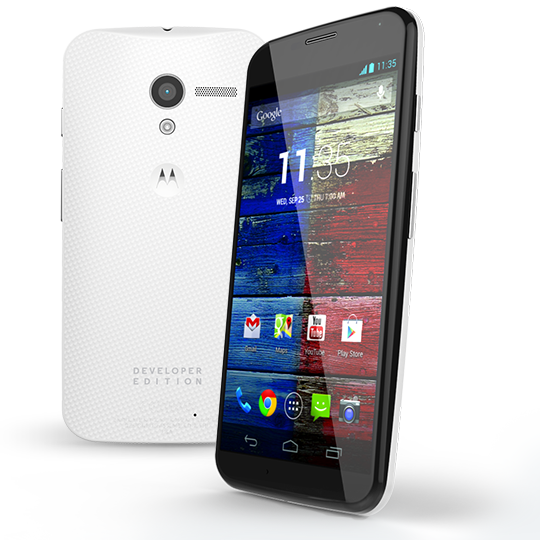
Motorola reveals : 32GB Moto X Developer Edition coming soon

Penulis : Pada Hari : Sunday, August 25, 2013 | Jam : 11:01 PM
Last week, Punit Soni (Motorola’s VP of Product Management) told us that we were “days” away from the arrival of Developer Editions and other carrier models of the Moto X. Yesterday, Motorola updated their Moto X “ways to buy” page, showing off the new Developer Edition, which will sport a black front panel coupled with a white woven rear back plate. The render of the phone also shows the words “DEVELOPER EDITION” engraved on the bottom.

The company says the phone will have “of course” an unlockable bootloader, but reminds you in footnotes that unlocking the bootloader of the phone “voids all warranties and may cause serious harm to your device.”

The page mentions that the dev edition will “have a look all its own,” meaning the two-tone color scheme is something different than what you’ll find in carrier models. Now, once MotoMaker is fully opened up or should you buy a Moto X card from AT&T, you could essentially build a similar looking device.

The listing also confirms 32GB of storage and an unlockable bootloader. No price is listed just yet, but since the AT&T 32GB model runs $629, I’d be surprised if it was lower.

As we said before, the phone can be already ordered from AT&T, with MotoMaker customization support coming soon. Other U.S. carriers including Verizon, Sprint and U.S. Cellular will also have the device in stores soon.
Read More » No comments

Motorola Moto X review: A comfy Android with mass appeal 


The good: The Motorola Moto X squeezes a speedy camera and futuristic voice command capabilities into a well-crafted design that hits the sweet spot between screen size and comfort. The phone has great battery life and is available in an endless variety of customized designs.

The bad: With no expandable storage, space could get tight, especially on the 16GB base model. The screen isn't as big and sharp as those on some competing handsets.

The bottom line: While in screen quality and storage capacity it lags behind rival superphones, the Moto X's superbly compact and comfortable design, whiz-bang voice controls, and long battery life make it a worthy Android contender.

To put it bluntly, Motorola has never created a true flagship ubersmartphone on the level of the Samsung Galaxy S4 and HTC One. But the company aims to change that with the Moto X. The $199 smartphone is Motorola's first handset fully developed under the auspices of its corporate parent (and Android godfather), Google. And it'll be available on most major U.S. carriers when it hits stores later in August.
Make no mistake; the Moto X isn't a fire-breathing mobile monster that will blow away the competitors in a spec sheet battle -- the screen isn't cutting-edge, and there's no expandable storage. Storage is the phone's biggest weakness: with just 16GB in the $199 model (the 32GB Moto costs $50 more) and no SD card slot for adding more, it's got an uphill battle on the value scale versus the HTC One (32GB by default) and Galaxy S4 (expansion slot onboard).
Storage qualms notwithstanding, though, the X is a nimble, compact handset with advanced capabilities that targets ordinary phone users. The Moto X boasts many of the same features that Motorola's new trio of Verizon Droids flaunt -- especially always-on Google Now voice control -- plus a few slick extras. Better yet, they're all crammed into a highly customizable design built for maximum comfort. This is a scrappy smartphone with enough going for it to bring the fight to the big boys.

A more thoughtful design
Under the thumb of Verizon's macho Droid brand for years, Motorola's smartphone industrial design has been well, industrial. Ever since the original Droid device hit the scene, Motorola has cranked out flagship machines sporting sharp angles, Kevlar coatings, and hard metallic trims.

To be fair, that's not a bad thing; those devices have been very popular. Plus the company's upcoming Droid mobile machines are less stark than their predecessors, featuring smoother curves and no metallic highlights. All three devices, though, the Droid Mini, the Droid Ultra, and the Droid Maxx, keep the traditionally aggressive red or sober black color scheme that's in keeping with Verizon's intimidating robotic franchise.

Motorola Moto X
The Moto X's compact, contoured shape makes it easy to hold.

The Moto X, however, pushes this history aside and attempts to turn an all-new page and gain broader appeal. Instead of harshly chiseled lines, the Moto X is sculpted with softly rounded curves. The phone's back is gently rounded for a more comfortable grip. It's an approach many hardware makers are taking these days, including HTC with its One and One Mini. The Galaxy S4 handset is also similarly contoured, but unlike Samsung's slippery, smudge-prone runaway hit, the Moto X has a textured soft-touch finish.
Motorola takes this contoured design a step further, shaping the back of the Moto X with left and right edges that slope at a sharper angle than the middle of the device. Motorola claims that this careful molding fits your hand better than a simpler uniform arc. The handset even uses a specially formed battery (2,200mAh, embedded) to match the Moto X's unique curvature.
Motorola Moto X
The bottom is sloped more steeply at the edges.

I have to admit that when I picked up Motorola's latest creation, it felt pretty damn good, its rounded frame fitting my fingers and palm like a glove. While I experience a similar reaction when I grip the HTC One, the Moto X's contours and solid chassis exude just as much quality and luxury to me. I also like how the phone's soft-touch backing wicks away moisture and fingerprints and has an almost metallic rigidity.
Choose from multiple colors and patterns for your Moto X.

These colors don't run
A huge part of the Moto X's design story is its made-in-America (or at least designed-and-assembled-in) moniker. As Motorola has explained earlier, it will design, engineer, and construct all Moto X units in the United States; Fort Worth, Texas, to be precise.
Consumers will have a choice of two basic colors to choose from when purchasing a new Moto X handset, white and black. Motorola, however, will offer buyers the option to personalize their phones with custom hues, patterns, and engravings crafted to order at Motorola's new Texas factory.
Motorola Moto X
The back of the Moto X uses a premium soft-touch finish.

These tweaking options, done through the Moto Maker online studio, include two front colors, 18 on the back, and seven accents. Motorola claims that this variety allows for thousands of permutations. There will even be custom wallpaper designs and cases to gussy up your device with. And thanks to the plant's Fort Worth location, shoppers who order the gadget can expect it to hit their doorstep within four days. Be advised that Moto Maker will be available for AT&T versions of the Moto X exclusively, at least at first.
Screen
In many respects the Moto X's display is a step down compared with what you get from the latest crop of premium smartphones. Competing devices such as the Sony Xperia Z, HTC One, and Samsung Galaxy S4 all have screens of 4.7 inches or larger. These gadgets also flaunt displays with full-HD resolutions (1,920x1,080 pixels), translating into massive views that still manage to offer high pixel densities.
By contrast the Moto X's 4.7-inch 720p (1,280 by 720 pixels) OLED screen, while no doubt large, doesn't serve up quite the same level of sharpness as HTC's and Samsung's mobile hot rods. I must stress, though, that unless you've had bionic eye implants or carry a jeweler's loupe, you probably won't pick up on any lack of detail. Additionally, the Moto X's OLED screen technology produces vivid colors, deep blacks, and wide viewing angles.
Of course a display's impact isn't based on just resolution, brightness, and color quality. Case in point: the Moto X's screen has an extremely thin bezel that lovingly hugs the front edges of the handset. Similar to those found on last year's Droid Razr M and the company's newly announced Droids, this helps the Moto X's display appear larger than life and command your attention.
Motorola Moto X
It's not superthin but it sure is compact.

Core components
Motorola calls the engine that propels the new Moto X its X8 Mobile Computing System, the same electronics under the hood of its new Droids. Claimed to include eight distinct processing cores, the system sure sounds impressive. When you break it all down, though, the X8 essentially is really just a souped-up 1.7GHz dual-core Qualcomm S4 Pro processor paired with quad-core Adreno 320 graphics.
To bring the core count up to eight, Motorola also throws in two additional low-power processing centers, one for contextual computing and another for analyzing spoken language. OK, so this may help the Moto X's total "core" tally reach the magic number, but I'm sure I'm not alone in crying foul.
When I think of numerous CPU cores, I envision multiple electronic brains of equal power and speed working in unison to tackle every smartphone task. Since not all of the X8's cores are created equal and they are relegated to specific tasks (all but two outside of general number-crunching), the Moto X is no true octa-core phone in my book.
That said, its power is nothing to sneeze at, either. The question remains how it'll compare with handsets with faster quad-core Snapdragon 600 chips. Hopefully the Moto X's 2GB allotment of RAM will keep the performance gap from being too great.
The Moto X runs Android 4.2.2, not version 4.3.

Software and interface
Given that the Moto X was born of the union between Motorola and Google, I was surprised to learn that it doesn't come with the freshest flavor of Android Jelly Bean (version 4.3). Rather, the phone runs Android 4.2.2 Jelly Bean. That said, Motorola has teamed up with Google to add plenty of neat tricks, the most notable of which is contextual computing, which the company refers to as "Touchless Control."
That's really a fancy way of saying that the phone runs a low-power microphone in the background with an ear continually trained on your voice. Just as with the new Motorola Droid Mini, Ultra, and Maxx, speaking a magic phrase at your Moto X tells the device to fire up the Google Now information app.
Speak, and the Moto X does your bidding.

In the Moto X's case, to begin you say, "OK, Google Now." From there you can ask a number of questions to find your current location, the weather, sports scores, and the answers to other queries. You can also tell the Moto X to set up reminders in your calendar, and initiate calls, texts, and e-mails a la Siri -- except you don't have to press a button.
The Moto X always has an ear out for your commands.

Aside from these slick voice capabilities, the Moto X's interface essentially remains the same as stock Jelly Bean. The five home screens, application tray, and widgets are pretty much identical to what you'd see on Google-approved machines such as the LG Nexus 4 and the Google Play Editions of the HTC One and Samsung Galaxy S4.
There are some slight yet important differences, though. The Moto X will softly pulse important notifications and alerts on the screen, even when asleep, as they occur. Motorola says this will help users conserve battery life since the phone won't have to power up the display each time the notification light flashes. Holding your finger on the center of the screen (and notification) causes the Moto X to display additional details for the alert. Dragging your finger upward takes you directly to the corresponding message if you decide more action is required.
Motorola Moto X
In our hands the Moto X proved to be a good listener.

Camera
What follows are our first impressions of the camera quality of the Moto X; we'll continue to update as we shoot more photos.
Apparently Motorola has finally taken camera capabilities seriously. Imaging has been an ongoing weakness of the company's handsets, but it's clear the Moto X is intended to address this deficiency. Motorola says its new device, equipped with a 10-megapixel "Clear Pixel" RGBC sensor and LED flash, can snap pictures with speed, and can grab 75 percent more light than competing smartphone cameras. That results in lower shutter times and clearer images under dark conditions.

Performance
I confess I'm pretty impressed with the Moto X's handling despite its dual-core processor. The phone feels very lively and responsive whether flipping through Android's menus and home screens or when launching apps. After subjecting the device to my usual gauntlet of benchmarks, I've found my results so far back up my impressions.

Moto X
The Moto X is quick but not crazy-fast.

The Moto X notched a Quadrant score of 8,519, which, though not as high as the astronomical scores the HTC One (12,194) and Samsung Galaxy S4 (11,381) garnered, is still respectable.

Call quality
I tested the Moto X on Verizon's CDMA network in New York and enjoyed good but not outstanding call quality. People I dialed with the handset described my voice as clear and loud, but flat and lacking warmth. They also noticed some clipping and dips in volume, especially at the beginning and ends of sentences.
This could be due to the X's complex noise suppression and voice recognition system, which leans on three microphones and its X8 hardware, but that's just speculation on my part.
Spoken words came through the Moto X's earpiece with plenty of oomph on my end. In fact, I had to dial the loudness down or risk eardrum pain. Another bright spot was the speakerphone, which sounded virtually identical to a regular phone call to my callers and belted out lots of volume.

Data speeds
Motorola says that five U.S. carriers will sell the Moto X: AT&T, Sprint, T-Mobile, Verizon, and U.S. Cellular. My test unit, however, was a Verizon-branded device, so linked to Big Red's 4G LTE data network. I tested the phone in various locations in New York City, recording performance via Ookla's Speedtest.net app.
Download speeds I observed were satisfyingly quick, clocking in at an average of 10.1Mbps. Upload throughput was also not too shabby, reaching an average speed of 6.8Mbps. In my experience AT&T is still the king of smokin' LTE data numbers, at least in New York. I typically see average downloads breaking the 20Mbps and uploads in the midteens.
Moto X
Verizon's 4G LTE delivered speedy data.
Battery life
Run time doesn't seem to be a problem. I was able to get the Moto X to perform a preliminary run of the CNET Labs video battery drain benchmark. The handset happily hummed along for quite a while, playing our sample HD movie for 10 hours and 9 minutes before calling it quits.
This places the Moto X in good company as far longevity is concerned. The HTC One managed 9 hours and 37 minutes on the same test while the Samsung Galaxy S4 persevered for an even longer average of 10 hours and 30 minutes.
Where can you get the Moto X?
Motorola will also push its new device hard, pledging that its enticing gadget will be sold by five U.S. wireless providers (AT&T, Sprint, T-Mobile, Verizon, and U.S. Cellular) in addition to an unlocked model. Expect the device to hit stores in late August or early September for a suggested price of $199.99.

Conclusion
Motorola's most impressive handset yet certainly packs in plenty of notable capabilities and functionality. But it's worth noting, also, that hard-core Android enthusiasts and spec junkies likely won't find the Moto X awe-inspiring. The 4.7-inch AMOLED screen is "only" 720p, and the nonexpandable 16GB of storage in the $199 model is a stumbling block; big-time media hounds and app addicts will burn through that quickly. In the absence of an expansion slot (like the Galaxy S4 has), I would've preferred that Motorola delivered 32GB in the baseline model, just like the HTC One -- or that the company had priced the phone at closer to $149 instead.
That said, Motorola took an unconventional tack with this handset. Instead of the traditional tactic of beating potential customers over the head with powerful components and every feature under the sun, Motorola decided to cater to shoppers' softer side -- focusing on how they use their phones every day.
To that end, the Moto X succeeds. It packs a great camera, has swift enough performance to satisfy all but the most demanding Android fanboys, and offers battery life that goes the distance. Throw in its superb, compact design and the Moto X doesn't even need to woo potential customers with its fancy Buck Rogers voice-recognition skills. That's merely the sweet icing on a mighty tasty cake.

Read More » No comments

Tips and tricks for Motorola's new Droid smartphones
These tips will help you transfer your data, share information with friends, and use your new smartphone to the fullest.


Motorola delivered a punch with its new Droid smartphones. Partnering with Verizon Wireless, the company announced the Droid Mini, Droid Ultra, and Droid Maxx at a press event in New York City last month. All three handsets are equipped with Motorola's custom X8 Mobile Computing System, 720p displays, 2GB of RAM, and 10-megapixel rear cameras. Motorola isn't pushing the specs, however, but is instead focusing on the unique features it has bundled with the devices.
Here's a list of some of those features and instructions on how to use them:

1. Motorola Migrate
 
It can be a hassle when it comes time to transfer files from an old phone to a new one. Luckily, the new Droids come with Motorola Migrate, a tool that can seamlessly transfer media, call and text history, and SIM contacts from your old device to your new one.
To do this, launch the Motorola Migrate app that comes preloaded on your Droid smartphone and hit the next button until you see a QR code on your screen. Then, download the app from the Google Play store on your old device, open it, select Start, and simply scan the QR code. The process will take several minutes to complete and in the end you should have most, if not all, of your old files on your new smartphone. 

2. Droid Zap
Droid Zap is built directly into the new Droid smartphones and gives them the ability to wirelessly share photos and videos with other Android devices within 1,000 feet. Unlike other sharing methods that require NFC, Bluetooth, or a Wi-Fi Direct connection, Droid Zap utilizes your data connection to quickly share files with other users.
The feature does have its fair share of limitations, though. Any Android device can receive shared content through the Droid Zap app, but only the three new Droid smartphones can send items to other users.
Droid Zap can be enabled in the Settings menu, while non-Droid devices can download the free app from the Google Play store. To use the feature on a new Droid device, enter the gallery, select the image or video you would like to share, and perform an upward two-finger swipe gesture on the screen. To receive a Zap on one of the new Droids simply perform a downward two-finger swipe gesture; those with non-Droid devices will be required to perform the same gesture inside the Droid Zap app.
The feature is responsive, easy to use, and actually very useful. Zaps can even be locked in the Settings menu, requiring users on the receiving end to enter a randomized code to view the shared material. 

3. Motorola Connect
Another interesting feature is Motorola Connect, a Chrome extension that allows you to see incoming calls and text messages when you are away from your phone. Using only your computer, you are able to ignore calls, and read and respond to text messages. The setup is relatively simple: go to your phone's settings, select Active Notifications, and turn on the Motorola Connect feature. Next, download the Motorola Connect extension in the Chrome Web Store, log in with your Google account, and you should be good to go.
Motorola Connect is supported on the Moto X, the Droid Mini, the Droid Ultra, and the Droid Maxx. 

4. Wireless Display
There has been a lot of buzz about Chromecast, the $35 dongle that allows you to wirelessly stream content from your mobile device to a TV. You may not have been aware, however, that the Droid Mini, the Droid Ultra, and the Droid Maxx include their own TV-sharing capabilities. Using Motorola's Wireless Display integration, the three smartphones can stream content to Miracast-compatible HDTVs.
The Wireless Display setting can be accessed through the Droid Command Center, which is located on the left side of the home screen clock widget. Make sure you are on the same Wi-Fi network as your HDTV, then turn the Wireless Display feature on, and select your TV from the list.
Your entire screen will then be mirrored on the TV, giving you the ability to browse the Web, play games, listen to music, or cast movies from your device to the TV screen.

Read More » No comments

Video Comparison: New Nexus 7 Vs the Old Nexus 7

Penulis : Pada Hari : Saturday, August 24, 2013 | Jam : 6:07 PM
We've talked a lot lately about the new Nexus 7 and compared the new and old models on paper, but this week we tested the two side-by-side and made a comparison video. You can find the video below, and we've included the transcription here if streaming video is not your thing.

Asus has once again built the Google Nexus 7 and we just got one in the AndroidPIT office. The first thing you notice is how different the new tablet looks compared to last year's model. For starters the back of the tablet now has a nice smooth finish which looks much better compared to the old Nexus' textured back.
You'll also notice the addition of a rear-facing camera on the new Nexus 7, a 5 MP snapper that didn't appear on the old model at all. However, both devices have 1.2 MP front-facing cameras that perform equally poorly. The new Nexus 7 now has internal stereo speakers.

How about dimensions? The new Nexus 7 is a little bit smaller than the older model, just under 2 mm thinner and a fraction thinner in width. The screens however are the same size, although the new model packs in a wonderful 323 pixels per inch comapred to the older model which only had 216 ppi in the same area – that's a neat 1.5 times more pixels per inch in the new Nexus 7.
Speaking of resolution, the 2013 Nexus 7 has slightly better than Full HD resolution, with 1920 x 1200 pixels. Full HD is 1920 x 1080 pixels. Similarly the old Nexus 7 had slightly better than HD resolution, with 1280 x 800 pixels, whereas HD resolution is 1280 x 720. This ''additional'' resolution is due to the 16:9 aspect ratio of the Nexus 7's. In comparison, the iPad Mini has a 4:3 aspect ratio – this is basically the difference between widescreen tvs and traditional television sets.


Once we turn the devices on you can really see the difference in screens. The new Nexus 7 has a 7-inch, LED-backlit, LCD IPS touchscreen, and combined with the additional pixel density the results are pretty stunning. It's seriously bright in comparison. The new Nexus 7 also shipped with Android 4.3 straight out of the box, and one of the main features of 4.3 is that it includes OpenGL ES3.0 graphics as standard. The old Nexus 7 is upgradable to Android 4.3 but the older Nexus 7 has GeForce graphics compared to the new model's Adreno 320 chip and of course, a lower pixel count.


As for CPU's the new Nexus 7 has a quad-core Snapdragon S4 Pro which we discovered is actually a throttled back Snapdragon 600 processor. The new Nexus 7 CPU ticks at 1.5 GHz whereas the Snapdragon 600 is capable of 1.7 GHz. In comparison the older model has a quad-core Asus Tegra 3 chip running at 1.2 GHz. So there's certainly a lot more speed available in the newer device. The new Nexus 7 also ships with 2 GB RAM.
Scrolling through the app pages it's easy to see the difference in lag time and smoothness between the new and old Nexus 7. We should note too that the new Nexus 7 comes with Google Play Games and Play Textbooks pre-installed. And considering the print-resolution display, the new Nexus 7 can certainly compete as an e-book reader – something Google mentioned during the launch of the device.
One of the interesting features of Android 4.3 is multi-user profiles that the device owner can apply restrictions to. Say if you're sharing your work tablet with the family at home and you want to protect valuable data. Or if you want to stop the kids going crazy with in-app purchases. It's super easy to set up and apply the restrictions you want. Switching between users is as simple as returning to the lock screen, and the owner's profile can be password or pattern lock protected.
Android 4.3 also has a function called TRIM, whereby the system regularly looks for old data points in the index and clears them up if the files they point to have since been deleted. This minefield of extinct data blocks was one of the main reasons the old Nexus 7 suffered from major slow-down over time. But with the OS update your old Nexus 7 should get a fresh lease on life. Of course the new Nexus 7 has TRIM from the start so it shouldn't suffer the slow-down at all.


Now there's been a few problems reported in the new Nexus 7, like GPS location issues, multi-touch weirdness and error messages when trying to update apps in the Play Store. We didn't experience any of these problems while we played with the device but there's enough reports of them to have Google scrambling to fix the bugs.
As far as battieries go, the new model actually has a smaller battery capacity than the older model: from 4325 mAh to 3950.. This shouldn't be a problem however as improved software integration should see a healthy shelf-life from the new model's battery pack. The smaller battery has also helped the new Nexus 7 come in 50 grams lighter than the 2012 model. 


So what does the new Nexus 7 cost? There's three options: $229 for the 16 GB model with WiFi, $269 for the 32 GB model with WiFi and $349 for the 32 GB version with WiFi and LTE, aka 4G.
While I previously said there's not too much in the way of improvements from the old Nexus 7 to the new (especially if you're perfectly happy with your old model) to warrant the upgrade, now that I've seen that extra resolution and improved graphics capability I have to say I'm possibly a convert.
Read More » No comments
How to Prevent Facebook friends from seeing you've read a message on Android.

Don't want your friend to see you've actually read a Facebook message? If you're an Android user, you're in luck.


Privy Chat for Facebook is a free Android app, available in the Play store, that prevents your friends from being able to see you've read a message. Originally covered by Ghacks, this small app is sure to be useful to Android users everywhere.

We've all felt the pressure to immediately reply to a message after opening it, knowing the sender can see you've read it. Or the rage that boils up inside after sending a message, only to see it's been read and no response sent in return.
As clever as read receipts appear to be in theory, they can do more harm than good.
By installing Privy Chat for Facebook on your Android device, you're able to fearlessly view incoming Facebook messages.
The app needs a ton of work, both on the user interface and features alike (you can't start a new conversation from within the app, or view any attachments), but it does what it's advertised to do.

A closed-eye icon next to an incoming message in the app indicates the message has yet to be marked as read, where an open eye indicates that the sender can see you've read it.
I recommend adding the app shortcut to one of your home screens and using it to read incoming messages. You can even reply directly within the app, which marks all messages in the conversation as read. 


Read More » No comments

Casio G'zOne Commando 4G LTE (Verizon) review

Penulis : Pada Hari : | Jam : 5:17 PM

Casio G'zOne Commando 4G LTE Spec :
  • Display: 4-inch TFT LCD at 480x800 resolution with Gorilla Glass 2
  • Processor: 1.5 GHz dual-core
  • OS: Android 4.0 Ice Cream Sandwich
  • Cameras: 8MP rear, 1.3MP front-facing
  • Storage: 16GB internal (you'll actually have less available)
  • RAM: 1GB
  • Dimensions: 5.1 by 2.7 by 0.5 inches
  • Weight: 6.17 ounces
  • Battery: 1,800 mAh
  • Other: NFC, external (wireless) charging, FM radio
Casio G'zOne Commando 4G LTE (Verizon) review:
The good: The waterproof Casio G'zOne Commando 4G LTE has fast 4G speeds, good call quality, dual front-facing speakers, and useful preloaded apps for the outdoors.
The bad: Its bulky build, poor photo quality, and outdated Android 4.0 Ice Cream Sandwich OS drag down performance.
The bottom line: The Casio G'zOne Commando 4G LTE is an excellent and affordable rugged handset, but skip it if taking great pictures is a priority.
The Casio G'zOne Commando 4G LTE isn't the sexiest phone to bring to a beach party, nor does it have the sexiest name (it's pronounced "jeez-one" in case you're wondering, as in jeez-one-person-should-be-fired-for-that-name). But if you're looking for smartphone that can survive almost anything, this is it.
That's because the rugged Commando was designed for someone who has an active, outdoorsy, and all-around swashbuckling lifestyle. It's water- and dustproof, can survive extreme temperatures, and is shock resistant.
True, the Commando isn't perfect. It doesn't take great photos, and it isn't as powerful as other high-end devices available on Verizon. But for $99.99 on-contract, Casio's Commando is a reasonably priced Android handset that's built to last.
Design
Let's not beat around the bush: the Commando 4G LTE is hefty and doesn't look very chic. Understandably, 6.08 ounces of its weightiness is thanks to the device's rugged exterior. Sporting distinct edges and a triangular chin, the handset flaunts an industrial, mechanical aesthetic, and its body is reinforced with tough rubber along its sides and back.
The smartphone measures 5.1 inches tall, 2.7 inches wide, and 0.5 inch thick. While stuffing it into my front jean pocket proved snug, I imagine it wouldn't have a problem fitting inside rear pockets of larger pants, and small shoulder bags. In addition, despite its bulky build, the Commando 4G LTE isn't particularly wide, meaning it's still easily maneuverable with one hand.


Aside from a volume rocker, the left edge houses a programmable shortcut (or "tactile" as Casio likes to put it) key that you can customize to launch applications like your contacts, Gmail, or music. Up top are a 3.5mm headphone jack that can be covered by a small plastic door, and a sleep/power button. On the right are a Micro-USB port that also can be plugged, and a charging terminal. Finally, the bottom edge features a small hole that you can loop a lanyard or strap through.
Fastened by four screws in each corner, the device's back sports a dimpled texture. The 8-megapixel camera is at the top left with its flash right next to it. A vertical toggle lock secures the battery door. To remove the plate, switch the lock upward. Then, using an indentation to the right, pry off the plate with your finger. The 1,800mAh battery inside is also locked down. If you want to access either the 4G LTE microSIM card or microSD card slots underneath it, slide the orange lock at the bottom of the battery to the right.
The 4-inch WVGA display has a 480x800-pixel resolution and is topped with Corning Gorilla Glass 2. Not only is it responsive to the touch, but it's also easy to view outdoors in sunlight, and has a respectably wide viewing angle. It accurately and brightly displayed an all-white color swatch, text and menu icons appeared clear, and HQ videos on YouTube also looked sharp.
Above the display are a 1.3-megapixel camera and the in-ear speaker embellish with a small chrome-colored piece of plastic. Below the screen are four hot keys (back, home, recent apps, and menu) that light up when in use. Finally, all the way at the bottom are dual front-facing speakers. Though at times music came off a bit harsh at max volume, these speakers boosted audio quality and depth.


Software features
It's been a little over a year since Android Jelly Bean came onto the scene, so it's disappointing to see that this handset runs on the older Android 4.0.4 Ice Cream Sandwich instead. You'll still get the usual batch of Google apps, though, which include Gmail, Plus, Hangouts, Maps, portals to the Play Books, Magazines, Movies and TV, Music, and Store, Search, and YouTube.
Basic task-managing apps include a calculator, a calendar, a clock with alarm functions, native e-mail and browser clients, a news and weather app, and a sound recorder. Verizon preloaded My Verizon Mobile (which lets you check your data use and minutes), Verizon Tones music and media store, mobile hot-spotting, its own brand of voice mail and navigating, Video Calling, and the media hub Viewdini.
Other apps include several Amazon apps (the store itself, Kindle, MP3, its app store, and Audible), an American Express app, a DNLA app for streaming media between devices, an FM radio, a help app for recording video alongside a movie editor, a music player, NFL mobile, the mobile office suite Quickoffice, Slacker Radio, Nuance voice command, a VPN client app, IMDb, and the shoe retailer Zappos.
Casio G'zOne Commando 4G LTE (screenshots)
Casio also packaged a handful of outdoorsy and active-lifestyle apps that come integrated in the phone's UI. Though I loathe bloatware, I personally find these apps useful and on-point with the kind of customers who would buy this phone.
One such add-on is G'zGear, which includes a compass (this compass is also featured in both the home and lock screens), a thermometer, a high/low tide weather app, and an app that tells you when the sun and moon will rise and set. There's also a star-gazing app, a pedometer and virtual trek tracker, and a barometer to measure atmospheric pressure. Some of these functions are also featured as home screen widgets for easy access, alongside a flashlight and battery-saver widget. You'll also get G'zWorld, an app that lets you record, share, and geotag all your outdoor activities, and Glove Mode.
As you can gather, users should activate Glove Mode when they're using the Commando 4G LTE while wearing gloves. When turned on, the device's UI simplifies into four simple categories: message and e-mail, notifications, camera, and phone. Once selected, the functionality of each of these four categories are simplified even further, allowing you to still use the most important features of the handset, but with the fewest taps and finger strokes as possible.
Camera and video
Both the 8-megapixel camera and 1.3-megapixel camera have digital zoom, an exposure meter, geotagging, a timer, six white balances, four color effects, two qualities, image stabilization, touch shutter, and grid lines. However, the 8-megapixel camera has six shooting modes (including HDR, continuous shooting, and panorama), 14 scene options (which has one mode just for cooking!), three focuses, seven sizes (from 640x480 to 3,264x2,448 pixels), and a flash. The front-facing latter camera has only three camera modes, three sizes (from 640x480 to 1,280x1,024 pixels), and a mirror image option.
For video recording, both cameras have audio muting and the same zoom, exposure meter, geotagging option, timer, white balances, color effects, two qualities, and grid lines functionality. The 8-megapixel camera specifically has four video modes (some of which are standard, slow motion, and live effects, which includes a silly faces module and the ability to change your video's background with a fake sunset sunset, for example), eight scene options, three focuses, a flash, and five video sizes (from message attachment to 1080p full HD). The front-facing camera can only record in standard mode, but the live effects (with the same six silly faces and background options) are still retained, and video sizes top out at 1,280x1,024-pixel resolution.
Photo quality was disappointing, and I expected sharper images from an 8-megapixel shooter (especially since I've seen clearer images from 5-megapixel cameras, like the LG Lucid 2). Colors looked washed out or inaccurate -- especially blues, which looked oversaturated and almost greenish. Edges looked blurry and I saw a lot of digital noise, even with pictures taken outdoors in ample sunlight.
Casio G'zOne Commando 4G LTE (indoor)

Casio G'zOne Commando 4G LTE (Verizon) User Review :

Pros Waterproof, drop proof, tough, cool features for the outdoors (G'z Gear), good speakers, rugged look (if you're into that kind of thing), good size screen.
Cons Bloatware, battery life is weak, not enough RAM, really stupid name (Jizz On?)
Summary
 I have had this phone for about a month now, and I like it a lot. For someone who spends a lot of time outdoors, this phone has been perfect. I can take it anywhere without fear that I might have to cross a river, get splashed by a wave, or when it falls out of my pocket onto some rocks the screen will break. The front speakers are pretty loud and clear, so this is the perfect shower phone. Crack open a beer, put on some jams, and soap off your grime. No worries about it getting wet.
I have dropped it half a dozen times, and no damage at all.
I live on the California coast and do a lot of hiking and biking, so the G'z Gear has been pretty useful. The sunrise/sunset app is great for planning walks, the pedometer and G'z World works like a GPS to save your favorite trails, the tides chart is great for planning tide pool excursions, and compasses are always useful. The barometer is cool to toy around with, and if you go camping and want to make your own weather forecasts, but because the battery life isn't great, this seems like it wouldn't be perfect. Having your own thermometer is great as well.
I haven't used the star gazer at night yet, but it looks accurate.
Flashlight is bright.
Camera seems like every other phone camera I have seen-mediocre but sufficient for quick pics. Video is the same. I have a real camera for doing any wildlife/scenic photography.
I have never used the newer version of Android OS, so Ice Cream Sandwhich seems fine to me. I can easily access my email, listen to music and watch movies on Google Play or the built in Music app, Google Maps are the best as always, etc.
The home page is easily customized, you can put all your apps on any page, open up to whichever page you need.
I haven't needed glove mode yet, it's still quite warm, but it worked when i did a trial, so that would be great for using your phone on the ski lift or something like that.
There are a few issues keeping this from being a 5 star product. They loaded up with Bloatware that suck up RAM and battery. 3 different amazon apps, zapos, slacker radio, amex, Google magazine, etc, etc. They are easily uninstalled/disabled, but it was annoying none the less. There is also only 700mb of RAM, which seems a bit underpowered to me. When no apps are running, Android takes up more than half of that, so multitasking is hard. You just have to make sure to quit/stop apps when you aren't using them. I've never used a S3 or anything, but I imagine they are a bit more powerful.
The battery also isn't great. This is probably the biggest issue for me. For a phone that is meant for outdoor people, having a phone that dies after 10-12 hours is stupid. It is already a beefy phone, they should have just made it a little bigger and put in a real battery to give the phone 24-48 hours of life.
Overall, I really like this phone. It is perfect for someone who spends a lot of time outdoors, and doesn't want to worry about their phone getting wet, dropped, or damaged. 
Read More » No comments
How Watch YouTube videos in a floating window on Android 

Wish your phone had the split-screen multitasking feature that is available on the Samsung Galaxy Note II? Now you can grab some of that functionality for YouTube videos.

If you own an Android tablet, or just a phone with a huge screen, watching YouTube videos while you perform other tasks can be superconvenient. Perhaps you're checking e-mail and watching videos from your favorite band, or maybe you're watching a scene from a play and following along in the script. This split-screen feature is available on the Samsung Galaxy Note II, but hasn't rolled out to many other handsets. Ready to add more multitasking power to your device?

First you'll need to install a copy of Floating YouTube Popup Video on your Android device, then follow these steps:
Step 1: Open a video through the native YouTube app.
Step 2: Press the Share button at the top of the screen and then choose the Floating YouTube app from the list.
Step 3: Position or resize the floating YouTube window on your screen.

The controls for the video will be fully functional, but be warned that the video may restart after moving it around on some devices.
Read More » No comments

Popular Posts

Labels